生成SDK
由于FastAPI基于OpenAPI规范,其API可以用许多工具都能理解的标准格式来描述。
这使得生成最新的文档、多种语言的客户端库(SDK)以及与代码保持同步的测试或自动化工作流变得非常容易。
在本指南中,您将学习如何为FastAPI后端生成TypeScript SDK。
开源SDK生成器
一个多功能的选择是OpenAPI Generator,它支持多种编程语言,并可以从您的OpenAPI规范生成SDK。
对于TypeScript客户端,Hey API是一个专为TypeScript生态系统优化的解决方案。
您可以在OpenAPI.Tools上发现更多SDK生成器。
Tip
FastAPI自动生成OpenAPI 3.1规范,因此您使用的任何工具都必须支持此版本。
FastAPI赞助商提供的SDK生成器
本节重点介绍由赞助FastAPI的公司提供的风险投资支持和公司支持的解决方案。这些产品在高质量生成的SDK基础上提供了额外功能和集成。
通过✨ 赞助FastAPI ✨,这些公司帮助确保框架及其生态系统保持健康和可持续。
他们的赞助也表明了对FastAPI社区(您)的坚定承诺,表明他们不仅关心提供优质服务,还支持一个强大且繁荣的框架,即FastAPI。🙇
例如,您可以尝试:
其中一些解决方案可能是开源的或提供免费层级,因此您可以在没有财务承诺的情况下尝试它们。其他商业SDK生成器也可在线找到。🤓
创建TypeScript SDK
让我们从一个简单的FastAPI应用程序开始:
from fastapi import FastAPI
from pydantic import BaseModel

app = FastAPI()


class Item(BaseModel):
    name: str
    price: float


class ResponseMessage(BaseModel):
    message: str


@app.post("/items/", response_model=ResponseMessage)
async def create_item(item: Item):
    return {"message": "item received"}


@app.get("/items/", response_model=list[Item])
async def get_items():
    return [
        {"name": "Plumbus", "price": 3},
        {"name": "Portal Gun", "price": 9001},
    ]
🤓 Other versions and variants
from typing import List

from fastapi import FastAPI
from pydantic import BaseModel

app = FastAPI()


class Item(BaseModel):
    name: str
    price: float


class ResponseMessage(BaseModel):
    message: str


@app.post("/items/", response_model=ResponseMessage)
async def create_item(item: Item):
    return {"message": "item received"}


@app.get("/items/", response_model=List[Item])
async def get_items():
    return [
        {"name": "Plumbus", "price": 3},
        {"name": "Portal Gun", "price": 9001},
    ]
请注意,路径操作使用模型Item和ResponseMessage定义了它们用于请求负载和响应负载的模型。
API文档
如果您访问/docs,您将看到它包含了请求和响应数据的模式:
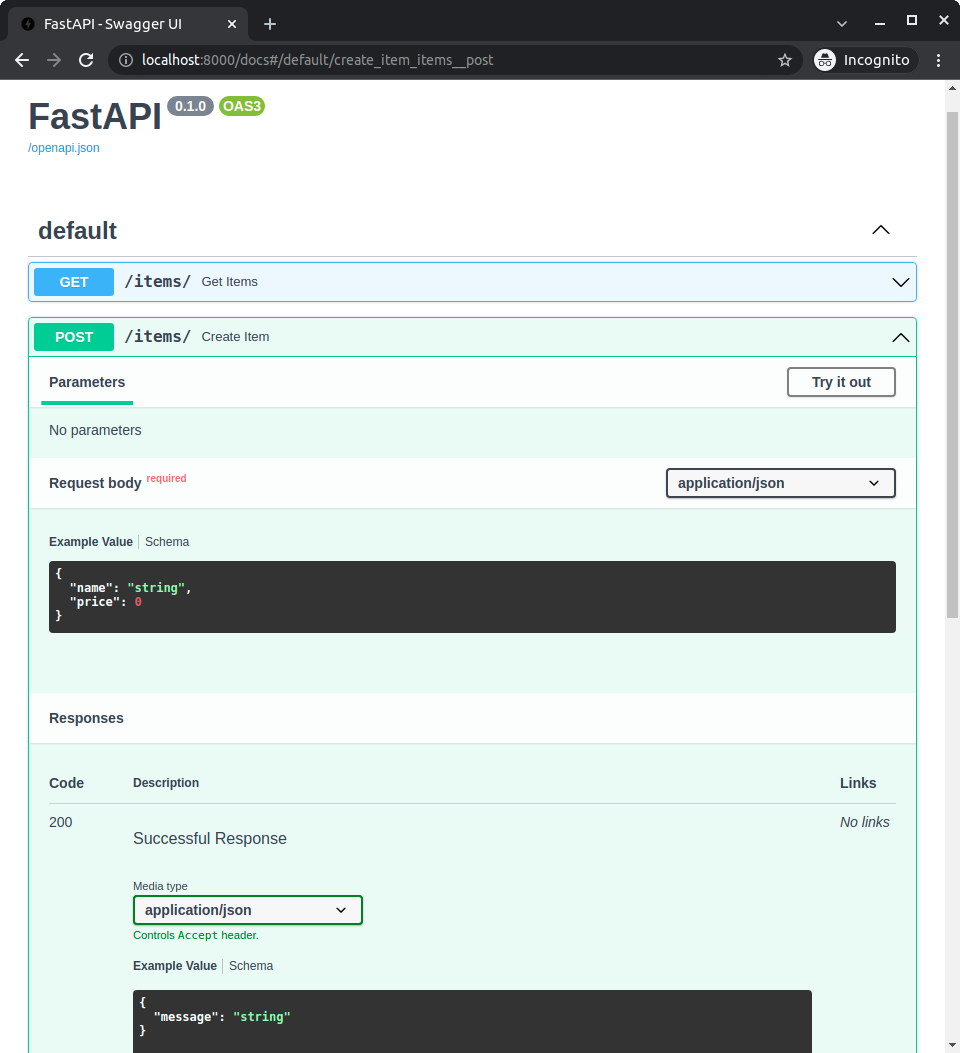
您可以看到这些模式,因为它们是用应用程序中的模型声明的。
这些信息可在应用程序的OpenAPI模式中找到,然后在API文档中显示。
模型中包含的这些相同信息可用于生成客户端代码。
Hey API
一旦我们有了带有模型的FastAPI应用程序,就可以使用Hey API生成TypeScript客户端。最快的方式是通过npx。
npx @hey-api/openapi-ts -i http://localhost:8000/openapi.json -o src/client
这将在./src/client中生成TypeScript SDK。
您可以在他们的网站上学习如何安装@hey-api/openapi-ts并阅读关于生成的输出的信息。
使用SDK
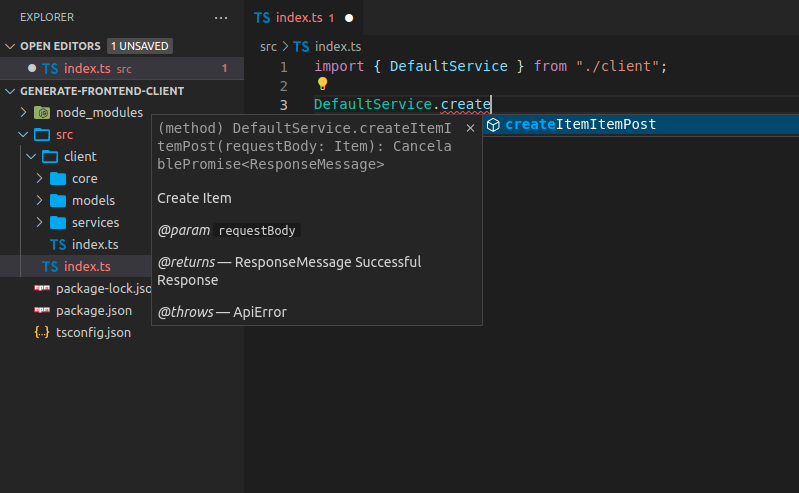
现在您可以导入并使用客户端代码。它可能看起来像这样,注意您会获得方法的自动补全:
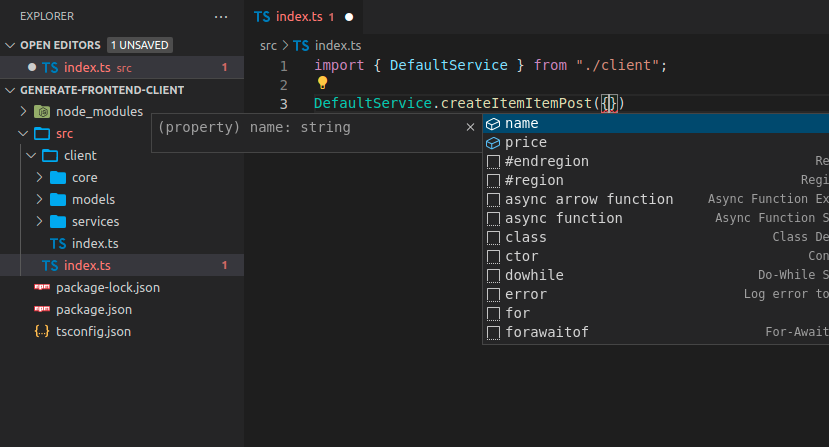
您还会获得发送负载的自动补全:
Tip
注意name和price的自动补全,这是在FastAPI应用程序中的Item模型中定义的。
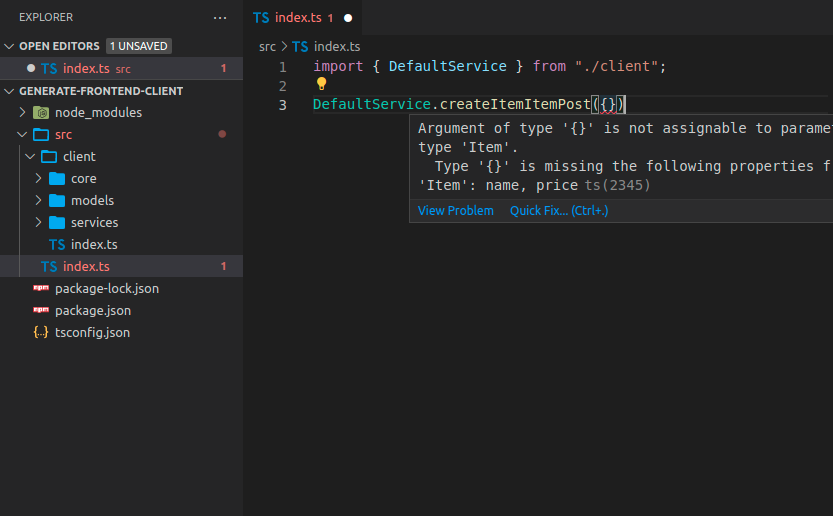
您将获得发送数据的行内错误提示:
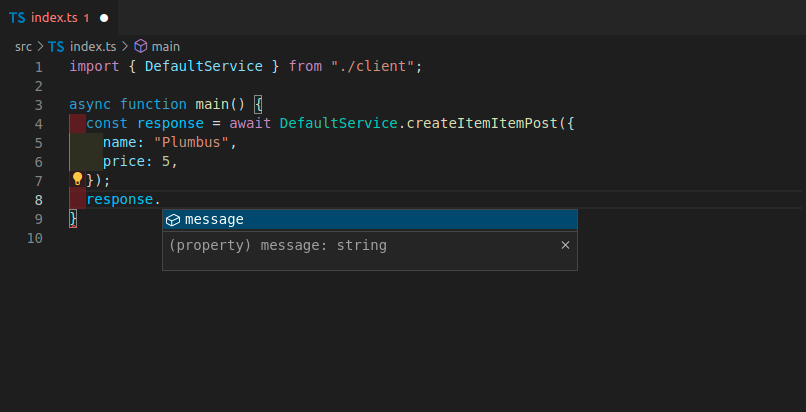
响应对象也会有自动补全:
带标签的FastAPI应用程序
在许多情况下,您的FastAPI应用程序会更大,您可能会使用标签来分隔不同的路径操作组。
例如,您可以有一个items部分和另一个users部分,它们可以通过标签分隔:
from fastapi import FastAPI
from pydantic import BaseModel

app = FastAPI()


class Item(BaseModel):
    name: str
    price: float


class ResponseMessage(BaseModel):
    message: str


class User(BaseModel):
    username: str
    email: str


@app.post("/items/", response_model=ResponseMessage, tags=["items"])
async def create_item(item: Item):
    return {"message": "Item received"}


@app.get("/items/", response_model=list[Item], tags=["items"])
async def get_items():
    return [
        {"name": "Plumbus", "price": 3},
        {"name": "Portal Gun", "price": 9001},
    ]


@app.post("/users/", response_model=ResponseMessage, tags=["users"])
async def create_user(user: User):
    return {"message": "User received"}
🤓 Other versions and variants
from typing import List

from fastapi import FastAPI
from pydantic import BaseModel

app = FastAPI()


class Item(BaseModel):
    name: str
    price: float


class ResponseMessage(BaseModel):
    message: str


class User(BaseModel):
    username: str
    email: str


@app.post("/items/", response_model=ResponseMessage, tags=["items"])
async def create_item(item: Item):
    return {"message": "Item received"}


@app.get("/items/", response_model=List[Item], tags=["items"])
async def get_items():
    return [
        {"name": "Plumbus", "price": 3},
        {"name": "Portal Gun", "price": 9001},
    ]


@app.post("/users/", response_model=ResponseMessage, tags=["users"])
async def create_user(user: User):
    return {"message": "User received"}
为带标签的应用程序生成TypeScript客户端
如果您为使用标签的FastAPI应用程序生成客户端,它通常也会根据标签分隔客户端代码。
这样,您可以为客户端代码正确组织和分组:
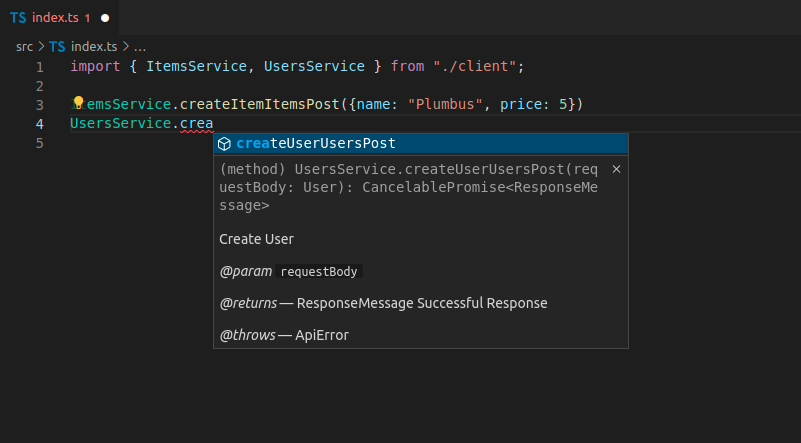
在这种情况下,您有:
ItemsServiceUsersService
客户端方法名称
目前,生成的方法名称如createItemItemsPost看起来不太整洁:
ItemsService.createItemItemsPost({name: "Plumbus", price: 5})
...这是因为客户端生成器使用了每个路径操作的OpenAPI内部操作ID。
OpenAPI要求每个操作ID在所有路径操作中是唯一的,因此FastAPI使用函数名称、路径和HTTP方法/操作来生成该操作ID,因为这样可以确保操作ID是唯一的。
但接下来我将向您展示如何改进这一点。🤓
自定义操作ID和更好的方法名称
您可以修改这些操作ID的生成方式,使它们更简单,并在客户端中拥有更简洁的方法名称。
在这种情况下,您需要通过其他方式确保每个操作ID是唯一的。
例如,您可以确保每个路径操作都有一个标签,然后基于标签和路径操作的名称(函数名称)生成操作ID。
自定义生成唯一ID函数
FastAPI为每个路径操作使用一个唯一ID,该ID用于操作ID以及任何需要的自定义模型的名称,用于请求或响应。
您可以自定义该函数。它接收一个APIRoute并输出一个字符串。
例如,这里它使用第一个标签(您可能只有一个标签)和路径操作名称(函数名称)。
然后,您可以将该自定义函数作为generate_unique_id_function参数传递给FastAPI:
from fastapi import FastAPI
from fastapi.routing import APIRoute
from pydantic import BaseModel


def custom_generate_unique_id(route: APIRoute):
    return f"{route.tags[0]}-{route.name}"


app = FastAPI(generate_unique_id_function=custom_generate_unique_id)


class Item(BaseModel):
    name: str
    price: float


class ResponseMessage(BaseModel):
    message: str


class User(BaseModel):
    username: str
    email: str


@app.post("/items/", response_model=ResponseMessage, tags=["items"])
async def create_item(item: Item):
    return {"message": "Item received"}


@app.get("/items/", response_model=list[Item], tags=["items"])
async def get_items():
    return [
        {"name": "Plumbus", "price": 3},
        {"name": "Portal Gun", "price": 9001},
    ]


@app.post("/users/", response_model=ResponseMessage, tags=["users"])
async def create_user(user: User):
    return {"message": "User received"}
🤓 Other versions and variants
from typing import List

from fastapi import FastAPI
from fastapi.routing import APIRoute
from pydantic import BaseModel


def custom_generate_unique_id(route: APIRoute):
    return f"{route.tags[0]}-{route.name}"


app = FastAPI(generate_unique_id_function=custom_generate_unique_id)


class Item(BaseModel):
    name: str
    price: float


class ResponseMessage(BaseModel):
    message: str


class User(BaseModel):
    username: str
    email: str


@app.post("/items/", response_model=ResponseMessage, tags=["items"])
async def create_item(item: Item):
    return {"message": "Item received"}


@app.get("/items/", response_model=List[Item], tags=["items"])
async def get_items():
    return [
        {"name": "Plumbus", "price": 3},
        {"name": "Portal Gun", "price": 9001},
    ]


@app.post("/users/", response_model=ResponseMessage, tags=["users"])
async def create_user(user: User):
    return {"message": "User received"}
使用自定义操作ID生成TypeScript客户端
现在,如果您再次生成客户端,您将看到它有了改进的方法名称:
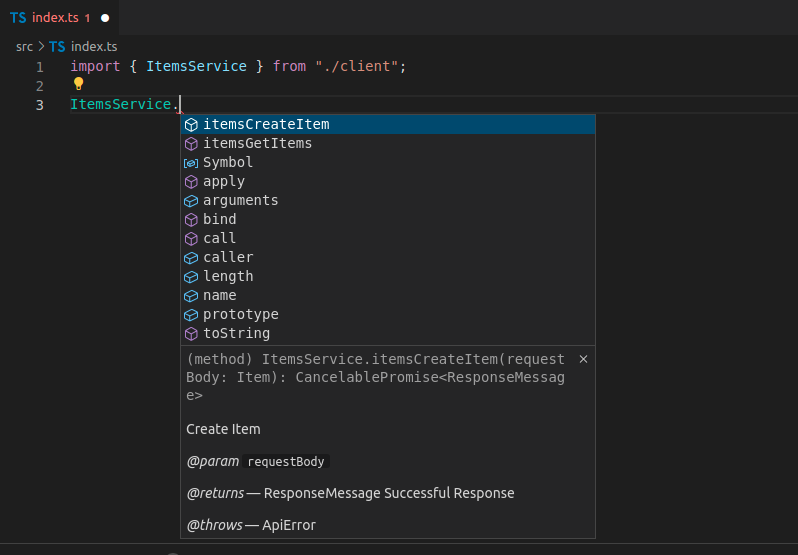
如您所见,方法名称现在有标签和函数名称,不再包含URL路径和HTTP操作的信息。
为客户端生成器预处理OpenAPI规范
生成的代码仍然有一些重复信息。
我们已经知道这个方法与items相关,因为这个词在ItemsService中(取自标签),但我们仍然在方法名称中也有标签名前缀。😕
我们可能仍然希望为OpenAPI保留它,因为这样可以确保操作ID是唯一的。
但对于生成的客户端,我们可以在生成客户端之前修改OpenAPI操作ID,以使这些方法名称更美观和简洁。
我们可以将OpenAPI JSON下载到文件openapi.json中,然后我们可以用类似以下的脚本删除该前缀标签:
import json
from pathlib import Path

file_path = Path("./openapi.json")
openapi_content = json.loads(file_path.read_text())

for path_data in openapi_content["paths"].values():
    for operation in path_data.values():
        tag = operation["tags"][0]
        operation_id = operation["operationId"]
        to_remove = f"{tag}-"
        new_operation_id = operation_id[len(to_remove) :]
        operation["operationId"] = new_operation_id

file_path.write_text(json.dumps(openapi_content))
import * as fs from 'fs'

async function modifyOpenAPIFile(filePath) {
  try {
    const data = await fs.promises.readFile(filePath)
    const openapiContent = JSON.parse(data)

    const paths = openapiContent.paths
    for (const pathKey of Object.keys(paths)) {
      const pathData = paths[pathKey]
      for (const method of Object.keys(pathData)) {
        const operation = pathData[method]
        if (operation.tags && operation.tags.length > 0) {
          const tag = operation.tags[0]
          const operationId = operation.operationId
          const toRemove = `${tag}-`
          if (operationId.startsWith(toRemove)) {
            const newOperationId = operationId.substring(toRemove.length)
            operation.operationId = newOperationId
          }
        }
      }
    }

    await fs.promises.writeFile(
      filePath,
      JSON.stringify(openapiContent, null, 2),
    )
    console.log('File successfully modified')
  } catch (err) {
    console.error('Error:', err)
  }
}

const filePath = './openapi.json'
modifyOpenAPIFile(filePath)
这样,操作ID将从类似items-get_items重命名为get_items,这样客户端生成器可以生成更简单的方法名称。
使用预处理后的OpenAPI生成TypeScript客户端
由于最终结果现在在openapi.json文件中,您需要更新输入位置:
npx @hey-api/openapi-ts -i ./openapi.json -o src/client
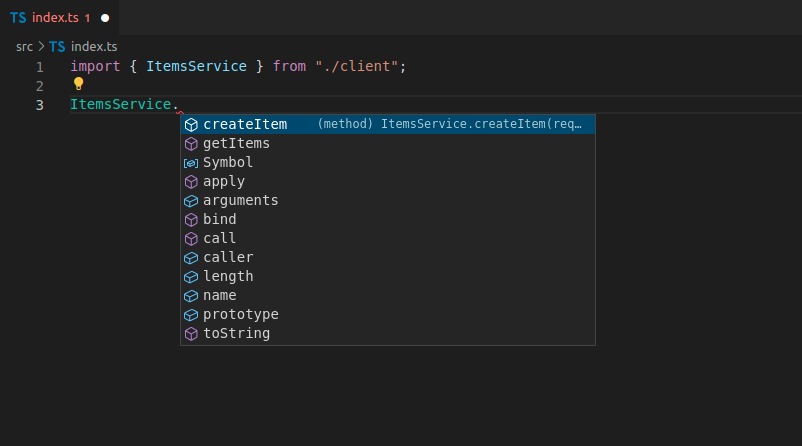
生成新客户端后,您现在将拥有干净的方法名称,并具有所有自动补全、行内错误等:
优势
使用自动生成的客户端时,您将获得以下内容的自动补全:
- 方法。
- 请求负载中的正文、查询参数等。
- 响应负载。
您还将获得所有内容的行内错误。
每当您更新后端代码并重新生成前端时,它将拥有任何新的路径操作作为方法可用,旧的方法将被删除,任何其他更改都将反映在生成的代码中。🤓
这也意味着如果某些内容发生了变化,它将自动反映在客户端代码中。如果您构建客户端,如果数据使用有任何不匹配,它将出错。
因此,您将在开发周期的早期检测到许多错误,而不是等待错误在生产中显示给最终用户,然后尝试调试问题所在。✨