OpenAPI 回调
你可以创建一个带有路径操作的API,该操作可以触发对由其他人创建的外部API的请求(很可能是使用你API的同一开发者)。
当你的API应用程序调用外部API时发生的过程被称为"回调"。因为外部开发者编写的软件会向你的API发送请求,然后你的API回呼,向外部API发送请求(该API很可能是由同一开发者创建的)。
在这种情况下,你可能希望记录该外部API应该是什么样子。它应该有什么路径操作,应该期望什么请求体,应该返回什么响应等等。
带有回调的应用
让我们通过一个例子来看这一切。
假设你开发了一个允许创建发票的应用。
这些发票将有id、title(可选)、customer和total。
你的API用户(外部开发者)将通过POST请求在你的API中创建发票。
然后你的API将(假设):
- 将发票发送给外部开发者的某个客户。
- 收取款项。
- 向API用户(外部开发者)发送通知。
- 这将通过(从你的API)向该外部开发者提供的某个外部API发送POST请求来完成(这就是"回调")。
普通的FastAPI应用
让我们首先看看在添加回调之前普通API应用的样子。
它将有一个路径操作,接收一个Invoice请求体和一个查询参数callback_url,该参数将包含回调的URL。
这部分非常普通,大部分代码你可能已经很熟悉了:
from typing import Union

from fastapi import APIRouter, FastAPI
from pydantic import BaseModel, HttpUrl

app = FastAPI()


class Invoice(BaseModel):
    id: str
    title: Union[str, None] = None
    customer: str
    total: float


class InvoiceEvent(BaseModel):
    description: str
    paid: bool


class InvoiceEventReceived(BaseModel):
    ok: bool


invoices_callback_router = APIRouter()


@invoices_callback_router.post(
    "{$callback_url}/invoices/{$request.body.id}", response_model=InvoiceEventReceived
)
def invoice_notification(body: InvoiceEvent):
    pass


@app.post("/invoices/", callbacks=invoices_callback_router.routes)
def create_invoice(invoice: Invoice, callback_url: Union[HttpUrl, None] = None):
    """
    Create an invoice.

    This will (let's imagine) let the API user (some external developer) create an
    invoice.

    And this path operation will:

    * Send the invoice to the client.
    * Collect the money from the client.
    * Send a notification back to the API user (the external developer), as a callback.
        * At this point is that the API will somehow send a POST request to the
            external API with the notification of the invoice event
            (e.g. "payment successful").
    """
    # Send the invoice, collect the money, send the notification (the callback)
    return {"msg": "Invoice received"}
Tip
callback_url查询参数使用了Pydantic的Url类型。
唯一的新东西是作为路径操作装饰器参数的callbacks=invoices_callback_router.routes。我们接下来会看到那是什么。
记录回调
实际的回调代码将严重依赖于你自己的API应用。
而且它可能会因应用而异。
它可能只是一两行代码,比如:
callback_url = "https://example.com/api/v1/invoices/events/"
httpx.post(callback_url, json={"description": "Invoice paid", "paid": True})
但回调最重要的部分可能是确保你的API用户(外部开发者)正确实现了外部API,根据你的API将在回调请求体中发送的数据等。
所以,我们接下来要做的是添加代码来记录外部API应该如何看起来以接收来自你的API的回调。
该文档将显示在你的API的Swagger UI中的/docs,它将让外部开发者知道如何构建外部API。
这个例子没有实现回调本身(那可能只是一行代码),只实现了文档部分。
编写回调文档代码
这段代码不会在你的应用中执行,我们只需要它来记录那个外部API应该是什么样子。
但是,你已经知道如何用FastAPI轻松创建API的自动文档。
所以我们将使用相同的知识来记录外部API应该是什么样子...通过创建外部API应该实现的路径操作(你的API将调用的那些)。
Tip
在编写记录回调的代码时,想象你是那个外部开发者可能会很有用。而且你正在实现外部API,而不是你的API。
暂时采用这种观点(外部开发者的观点)可以帮助你感觉更明显在哪里放置参数、请求体的Pydantic模型、响应的模型等,对于那个外部API。
创建一个回调APIRouter
首先创建一个新的APIRouter,它将包含一个或多个回调。
from typing import Union

from fastapi import APIRouter, FastAPI
from pydantic import BaseModel, HttpUrl

app = FastAPI()


class Invoice(BaseModel):
    id: str
    title: Union[str, None] = None
    customer: str
    total: float


class InvoiceEvent(BaseModel):
    description: str
    paid: bool


class InvoiceEventReceived(BaseModel):
    ok: bool


invoices_callback_router = APIRouter()


@invoices_callback_router.post(
    "{$callback_url}/invoices/{$request.body.id}", response_model=InvoiceEventReceived
)
def invoice_notification(body: InvoiceEvent):
    pass


@app.post("/invoices/", callbacks=invoices_callback_router.routes)
def create_invoice(invoice: Invoice, callback_url: Union[HttpUrl, None] = None):
    """
    Create an invoice.

    This will (let's imagine) let the API user (some external developer) create an
    invoice.

    And this path operation will:

    * Send the invoice to the client.
    * Collect the money from the client.
    * Send a notification back to the API user (the external developer), as a callback.
        * At this point is that the API will somehow send a POST request to the
            external API with the notification of the invoice event
            (e.g. "payment successful").
    """
    # Send the invoice, collect the money, send the notification (the callback)
    return {"msg": "Invoice received"}
创建回调路径操作
要创建回调路径操作,使用上面创建的同一个APIRouter。
它应该看起来就像一个普通的FastAPI路径操作:
- 它应该可能有它应该接收的请求体的声明,例如
body: InvoiceEvent。 - 它也可以有它应该返回的响应的声明,例如
response_model=InvoiceEventReceived。
from typing import Union

from fastapi import APIRouter, FastAPI
from pydantic import BaseModel, HttpUrl

app = FastAPI()


class Invoice(BaseModel):
    id: str
    title: Union[str, None] = None
    customer: str
    total: float


class InvoiceEvent(BaseModel):
    description: str
    paid: bool


class InvoiceEventReceived(BaseModel):
    ok: bool


invoices_callback_router = APIRouter()


@invoices_callback_router.post(
    "{$callback_url}/invoices/{$request.body.id}", response_model=InvoiceEventReceived
)
def invoice_notification(body: InvoiceEvent):
    pass


@app.post("/invoices/", callbacks=invoices_callback_router.routes)
def create_invoice(invoice: Invoice, callback_url: Union[HttpUrl, None] = None):
    """
    Create an invoice.

    This will (let's imagine) let the API user (some external developer) create an
    invoice.

    And this path operation will:

    * Send the invoice to the client.
    * Collect the money from the client.
    * Send a notification back to the API user (the external developer), as a callback.
        * At this point is that the API will somehow send a POST request to the
            external API with the notification of the invoice event
            (e.g. "payment successful").
    """
    # Send the invoice, collect the money, send the notification (the callback)
    return {"msg": "Invoice received"}
与普通路径操作有2个主要区别:
- 它不需要有任何实际代码,因为你的应用永远不会调用这段代码。它只用于记录外部API。所以,函数可以只有
pass。 - 路径可以包含一个OpenAPI 3表达式(见下文),其中可以使用变量和原始请求发送到你的API的部分。
回调路径表达式
回调路径可以有一个OpenAPI 3表达式,可以包含发送到你的API的原始请求的部分。
在这种情况下,它是str:
"{$callback_url}/invoices/{$request.body.id}"
所以,如果你的API用户(外部开发者)向你的API发送请求到:
https://yourapi.com/invoices/?callback_url=https://www.external.org/events
带有JSON请求体:
{
    "id": "2expen51ve",
    "customer": "Mr. Richie Rich",
    "total": "9999"
}
然后你的API将处理发票,并在稍后的某个时间点,向callback_url(外部API)发送回调请求:
https://www.external.org/events/invoices/2expen51ve
带有包含类似内容的JSON请求体:
{
    "description": "Payment celebration",
    "paid": true
}
并且它会期望从那个外部API返回一个带有类似JSON请求体的响应:
{
    "ok": true
}
Tip
注意回调URL如何包含在callback_url中作为查询参数接收的URL(https://www.external.org/events)以及JSON请求体中的发票id(2expen51ve)。
添加回调路由器
此时你已经在上面创建的回调路由器中有了所需的回调路径操作(外部开发者应该在外部API中实现的那些)。
现在在你的API的路径操作装饰器中使用参数callbacks来传递该回调路由器的属性.routes(那实际上只是一个路由/路径操作的列表):
from typing import Union

from fastapi import APIRouter, FastAPI
from pydantic import BaseModel, HttpUrl

app = FastAPI()


class Invoice(BaseModel):
    id: str
    title: Union[str, None] = None
    customer: str
    total: float


class InvoiceEvent(BaseModel):
    description: str
    paid: bool


class InvoiceEventReceived(BaseModel):
    ok: bool


invoices_callback_router = APIRouter()


@invoices_callback_router.post(
    "{$callback_url}/invoices/{$request.body.id}", response_model=InvoiceEventReceived
)
def invoice_notification(body: InvoiceEvent):
    pass


@app.post("/invoices/", callbacks=invoices_callback_router.routes)
def create_invoice(invoice: Invoice, callback_url: Union[HttpUrl, None] = None):
    """
    Create an invoice.

    This will (let's imagine) let the API user (some external developer) create an
    invoice.

    And this path operation will:

    * Send the invoice to the client.
    * Collect the money from the client.
    * Send a notification back to the API user (the external developer), as a callback.
        * At this point is that the API will somehow send a POST request to the
            external API with the notification of the invoice event
            (e.g. "payment successful").
    """
    # Send the invoice, collect the money, send the notification (the callback)
    return {"msg": "Invoice received"}
Tip
注意你不是将路由器本身(invoices_callback_router)传递给callback=,而是属性.routes,如invoices_callback_router.routes。
检查文档
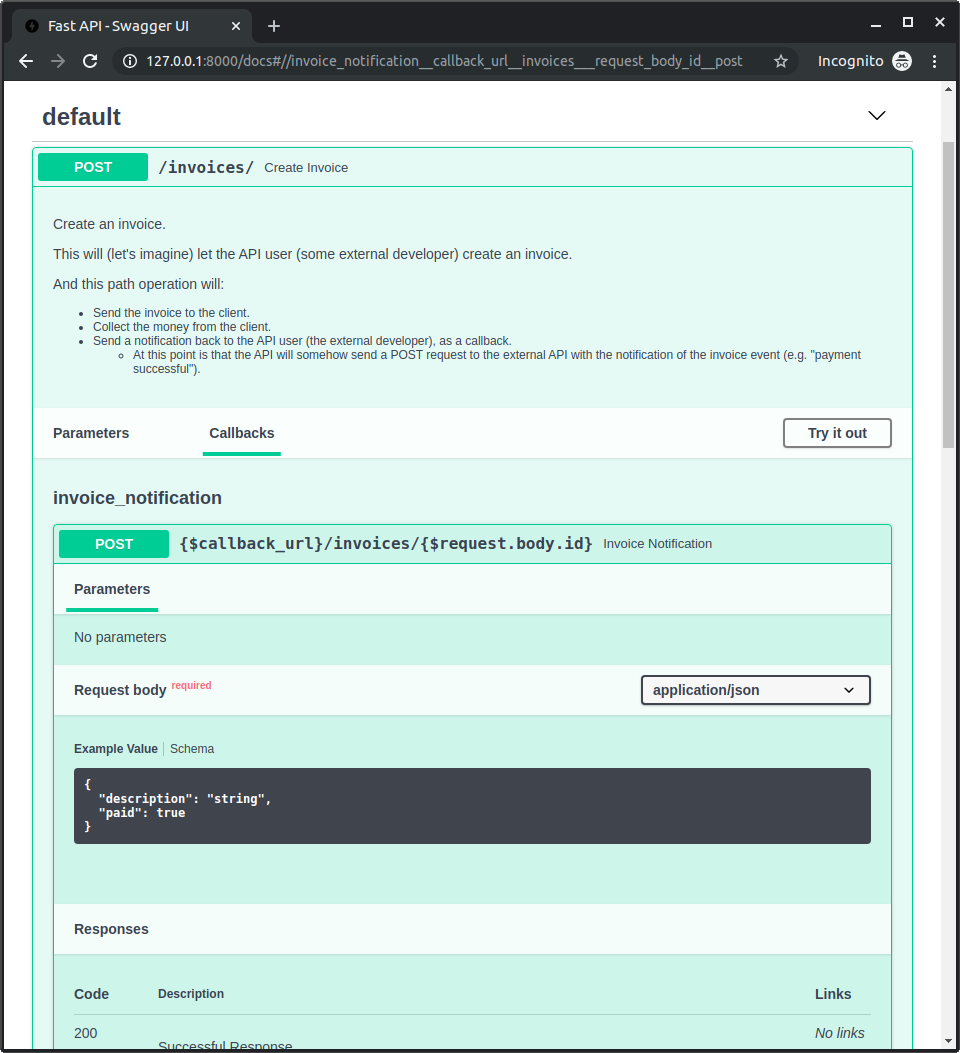
现在你可以启动你的应用并前往http://127.0.0.1:8000/docs。
你将看到你的文档,包括一个"Callbacks"部分,用于你的路径操作,显示外部API应该是什么样子: