配置 Swagger UI
您可以配置一些额外的 Swagger UI 参数。
要配置这些参数,请在创建 FastAPI() 应用对象时或调用 get_swagger_ui_html() 函数时传递 swagger_ui_parameters 参数。
swagger_ui_parameters 接收一个包含直接传递给 Swagger UI 的配置的字典。
FastAPI 会将配置转换为 JSON 格式以使其与 JavaScript 兼容,因为这是 Swagger UI 所需的。
禁用语法高亮
例如,您可以禁用 Swagger UI 中的语法高亮。
在不更改设置的情况下,语法高亮默认是启用的:
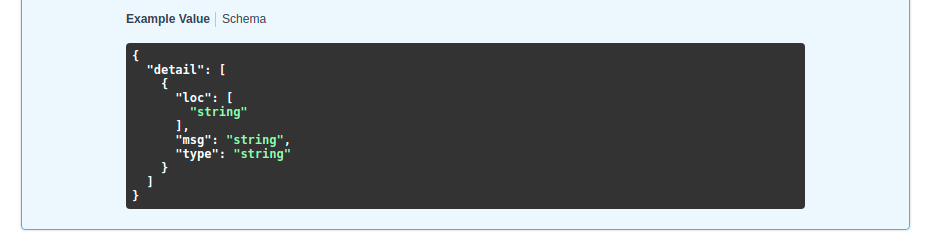
但您可以通过将 syntaxHighlight 设置为 False 来禁用它:
from fastapi import FastAPI

app = FastAPI(swagger_ui_parameters={"syntaxHighlight": False})


@app.get("/users/{username}")
async def read_user(username: str):
    return {"message": f"Hello {username}"}
...然后 Swagger UI 将不再显示语法高亮:
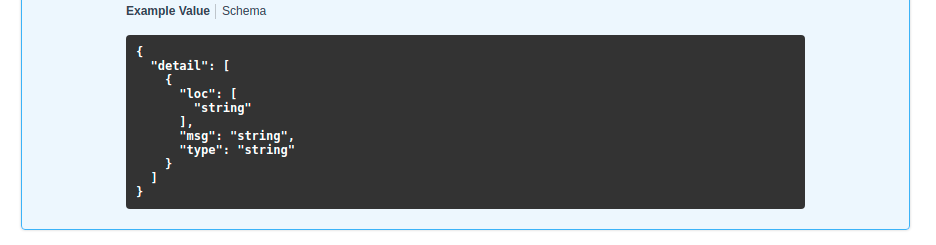
更改主题
同样地,您可以使用键 "syntaxHighlight.theme"(注意中间有一个点)来设置语法高亮主题:
from fastapi import FastAPI

app = FastAPI(swagger_ui_parameters={"syntaxHighlight": {"theme": "obsidian"}})


@app.get("/users/{username}")
async def read_user(username: str):
    return {"message": f"Hello {username}"}
该配置将更改语法高亮的颜色主题:
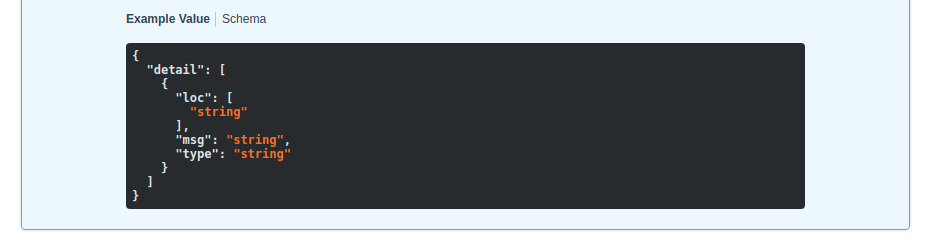
更改默认 Swagger UI 参数
FastAPI 包含一些适用于大多数用例的默认配置参数。
它包含以下默认配置:
# Code above omitted 👆

swagger_ui_default_parameters: Annotated[
    Dict[str, Any],
    Doc(
        """
        Default configurations for Swagger UI.

        You can use it as a template to add any other configurations needed.
        """
    ),
] = {
    "dom_id": "#swagger-ui",
    "layout": "BaseLayout",
    "deepLinking": True,
    "showExtensions": True,
    "showCommonExtensions": True,
}

# Code below omitted 👇
👀 Full file preview
import json
from typing import Any, Dict, Optional

from fastapi.encoders import jsonable_encoder
from starlette.responses import HTMLResponse
from typing_extensions import Annotated, Doc

swagger_ui_default_parameters: Annotated[
    Dict[str, Any],
    Doc(
        """
        Default configurations for Swagger UI.

        You can use it as a template to add any other configurations needed.
        """
    ),
] = {
    "dom_id": "#swagger-ui",
    "layout": "BaseLayout",
    "deepLinking": True,
    "showExtensions": True,
    "showCommonExtensions": True,
}


def get_swagger_ui_html(
    *,
    openapi_url: Annotated[
        str,
        Doc(
            """
            The OpenAPI URL that Swagger UI should load and use.

            This is normally done automatically by FastAPI using the default URL
            `/openapi.json`.
            """
        ),
    ],
    title: Annotated[
        str,
        Doc(
            """
            The HTML `<title>` content, normally shown in the browser tab.
            """
        ),
    ],
    swagger_js_url: Annotated[
        str,
        Doc(
            """
            The URL to use to load the Swagger UI JavaScript.

            It is normally set to a CDN URL.
            """
        ),
    ] = "https://cdn.jsdelivr.net/npm/swagger-ui-dist@5/swagger-ui-bundle.js",
    swagger_css_url: Annotated[
        str,
        Doc(
            """
            The URL to use to load the Swagger UI CSS.

            It is normally set to a CDN URL.
            """
        ),
    ] = "https://cdn.jsdelivr.net/npm/swagger-ui-dist@5/swagger-ui.css",
    swagger_favicon_url: Annotated[
        str,
        Doc(
            """
            The URL of the favicon to use. It is normally shown in the browser tab.
            """
        ),
    ] = "https://fastapi.tiangolo.com/img/favicon.png",
    oauth2_redirect_url: Annotated[
        Optional[str],
        Doc(
            """
            The OAuth2 redirect URL, it is normally automatically handled by FastAPI.
            """
        ),
    ] = None,
    init_oauth: Annotated[
        Optional[Dict[str, Any]],
        Doc(
            """
            A dictionary with Swagger UI OAuth2 initialization configurations.
            """
        ),
    ] = None,
    swagger_ui_parameters: Annotated[
        Optional[Dict[str, Any]],
        Doc(
            """
            Configuration parameters for Swagger UI.

            It defaults to [swagger_ui_default_parameters][fastapi.openapi.docs.swagger_ui_default_parameters].
            """
        ),
    ] = None,
) -> HTMLResponse:
    """
    Generate and return the HTML  that loads Swagger UI for the interactive
    API docs (normally served at `/docs`).

    You would only call this function yourself if you needed to override some parts,
    for example the URLs to use to load Swagger UI's JavaScript and CSS.

    Read more about it in the
    [FastAPI docs for Configure Swagger UI](https://fastapi.tiangolo.com/how-to/configure-swagger-ui/)
    and the [FastAPI docs for Custom Docs UI Static Assets (Self-Hosting)](https://fastapi.tiangolo.com/how-to/custom-docs-ui-assets/).
    """
    current_swagger_ui_parameters = swagger_ui_default_parameters.copy()
    if swagger_ui_parameters:
        current_swagger_ui_parameters.update(swagger_ui_parameters)

    html = f"""
    <!DOCTYPE html>
    <html>
    <head>
    <link type="text/css" rel="stylesheet" href="{swagger_css_url}">
    <link rel="shortcut icon" href="{swagger_favicon_url}">
    <title>{title}</title>
    </head>
    <body>
    <div id="swagger-ui">
    </div>
    <script src="{swagger_js_url}"></script>
    <!-- `SwaggerUIBundle` is now available on the page -->
    <script>
    const ui = SwaggerUIBundle({{
        url: '{openapi_url}',
    """

    for key, value in current_swagger_ui_parameters.items():
        html += f"{json.dumps(key)}: {json.dumps(jsonable_encoder(value))},\n"

    if oauth2_redirect_url:
        html += f"oauth2RedirectUrl: window.location.origin + '{oauth2_redirect_url}',"

    html += """
    presets: [
        SwaggerUIBundle.presets.apis,
        SwaggerUIBundle.SwaggerUIStandalonePreset
        ],
    })"""

    if init_oauth:
        html += f"""
        ui.initOAuth({json.dumps(jsonable_encoder(init_oauth))})
        """

    html += """
    </script>
    </body>
    </html>
    """
    return HTMLResponse(html)


def get_redoc_html(
    *,
    openapi_url: Annotated[
        str,
        Doc(
            """
            The OpenAPI URL that ReDoc should load and use.

            This is normally done automatically by FastAPI using the default URL
            `/openapi.json`.
            """
        ),
    ],
    title: Annotated[
        str,
        Doc(
            """
            The HTML `<title>` content, normally shown in the browser tab.
            """
        ),
    ],
    redoc_js_url: Annotated[
        str,
        Doc(
            """
            The URL to use to load the ReDoc JavaScript.

            It is normally set to a CDN URL.
            """
        ),
    ] = "https://cdn.jsdelivr.net/npm/redoc@2/bundles/redoc.standalone.js",
    redoc_favicon_url: Annotated[
        str,
        Doc(
            """
            The URL of the favicon to use. It is normally shown in the browser tab.
            """
        ),
    ] = "https://fastapi.tiangolo.com/img/favicon.png",
    with_google_fonts: Annotated[
        bool,
        Doc(
            """
            Load and use Google Fonts.
            """
        ),
    ] = True,
) -> HTMLResponse:
    """
    Generate and return the HTML response that loads ReDoc for the alternative
    API docs (normally served at `/redoc`).

    You would only call this function yourself if you needed to override some parts,
    for example the URLs to use to load ReDoc's JavaScript and CSS.

    Read more about it in the
    [FastAPI docs for Custom Docs UI Static Assets (Self-Hosting)](https://fastapi.tiangolo.com/how-to/custom-docs-ui-assets/).
    """
    html = f"""
    <!DOCTYPE html>
    <html>
    <head>
    <title>{title}</title>
    <!-- needed for adaptive design -->
    <meta charset="utf-8"/>
    <meta name="viewport" content="width=device-width, initial-scale=1">
    """
    if with_google_fonts:
        html += """
    <link href="https://fonts.googleapis.com/css?family=Montserrat:300,400,700|Roboto:300,400,700" rel="stylesheet">
    """
    html += f"""
    <link rel="shortcut icon" href="{redoc_favicon_url}">
    <!--
    ReDoc doesn't change outer page styles
    -->
    <style>
      body {{
        margin: 0;
        padding: 0;
      }}
    </style>
    </head>
    <body>
    <noscript>
        ReDoc requires Javascript to function. Please enable it to browse the documentation.
    </noscript>
    <redoc spec-url="{openapi_url}"></redoc>
    <script src="{redoc_js_url}"> </script>
    </body>
    </html>
    """
    return HTMLResponse(html)


def get_swagger_ui_oauth2_redirect_html() -> HTMLResponse:
    """
    Generate the HTML response with the OAuth2 redirection for Swagger UI.

    You normally don't need to use or change this.
    """
    # copied from https://github.com/swagger-api/swagger-ui/blob/v4.14.0/dist/oauth2-redirect.html
    html = """
    <!doctype html>
    <html lang="en-US">
    <head>
        <title>Swagger UI: OAuth2 Redirect</title>
    </head>
    <body>
    <script>
        'use strict';
        function run () {
            var oauth2 = window.opener.swaggerUIRedirectOauth2;
            var sentState = oauth2.state;
            var redirectUrl = oauth2.redirectUrl;
            var isValid, qp, arr;

            if (/code|token|error/.test(window.location.hash)) {
                qp = window.location.hash.substring(1).replace('?', '&');
            } else {
                qp = location.search.substring(1);
            }

            arr = qp.split("&");
            arr.forEach(function (v,i,_arr) { _arr[i] = '"' + v.replace('=', '":"') + '"';});
            qp = qp ? JSON.parse('{' + arr.join() + '}',
                    function (key, value) {
                        return key === "" ? value : decodeURIComponent(value);
                    }
            ) : {};

            isValid = qp.state === sentState;

            if ((
              oauth2.auth.schema.get("flow") === "accessCode" ||
              oauth2.auth.schema.get("flow") === "authorizationCode" ||
              oauth2.auth.schema.get("flow") === "authorization_code"
            ) && !oauth2.auth.code) {
                if (!isValid) {
                    oauth2.errCb({
                        authId: oauth2.auth.name,
                        source: "auth",
                        level: "warning",
                        message: "Authorization may be unsafe, passed state was changed in server. The passed state wasn't returned from auth server."
                    });
                }

                if (qp.code) {
                    delete oauth2.state;
                    oauth2.auth.code = qp.code;
                    oauth2.callback({auth: oauth2.auth, redirectUrl: redirectUrl});
                } else {
                    let oauthErrorMsg;
                    if (qp.error) {
                        oauthErrorMsg = "["+qp.error+"]: " +
                            (qp.error_description ? qp.error_description+ ". " : "no accessCode received from the server. ") +
                            (qp.error_uri ? "More info: "+qp.error_uri : "");
                    }

                    oauth2.errCb({
                        authId: oauth2.auth.name,
                        source: "auth",
                        level: "error",
                        message: oauthErrorMsg || "[Authorization failed]: no accessCode received from the server."
                    });
                }
            } else {
                oauth2.callback({auth: oauth2.auth, token: qp, isValid: isValid, redirectUrl: redirectUrl});
            }
            window.close();
        }

        if (document.readyState !== 'loading') {
            run();
        } else {
            document.addEventListener('DOMContentLoaded', function () {
                run();
            });
        }
    </script>
    </body>
    </html>
        """
    return HTMLResponse(content=html)
您可以通过在 swagger_ui_parameters 参数中设置不同的值来覆盖其中任何一项。
例如,要禁用 deepLinking,您可以将这些设置传递给 swagger_ui_parameters:
from fastapi import FastAPI

app = FastAPI(swagger_ui_parameters={"deepLinking": False})


@app.get("/users/{username}")
async def read_user(username: str):
    return {"message": f"Hello {username}"}
其他 Swagger UI 参数
要查看所有其他可能的配置,请阅读官方的 Swagger UI 参数文档。
仅限 JavaScript 的设置
Swagger UI 还允许其他配置为 仅限 JavaScript 的对象(例如,JavaScript 函数)。
FastAPI 也包含这些仅限 JavaScript 的 presets 设置:
presets: [
    SwaggerUIBundle.presets.apis,
    SwaggerUIBundle.SwaggerUIStandalonePreset
]
这些是 JavaScript 对象,不是字符串,因此您不能直接从 Python 代码传递它们。
如果您需要使用像这样的仅限 JavaScript 配置,您可以使用上述方法之一。覆盖所有 Swagger UI 路径操作 并手动编写您需要的任何 JavaScript。