声明请求示例数据
你可以声明应用能够接收的数据示例。
以下是几种实现方式。
Pydantic 模型中的额外 JSON Schema 数据
你可以为 Pydantic 模型声明 examples,这些示例将被添加到生成的 JSON Schema 中。
from fastapi import FastAPI
from pydantic import BaseModel

app = FastAPI()


class Item(BaseModel):
    name: str
    description: str | None = None
    price: float
    tax: float | None = None

    model_config = {
        "json_schema_extra": {
            "examples": [
                {
                    "name": "Foo",
                    "description": "A very nice Item",
                    "price": 35.4,
                    "tax": 3.2,
                }
            ]
        }
    }


@app.put("/items/{item_id}")
async def update_item(item_id: int, item: Item):
    results = {"item_id": item_id, "item": item}
    return results
🤓 Other versions and variants
from typing import Union

from fastapi import FastAPI
from pydantic import BaseModel

app = FastAPI()


class Item(BaseModel):
    name: str
    description: Union[str, None] = None
    price: float
    tax: Union[float, None] = None

    model_config = {
        "json_schema_extra": {
            "examples": [
                {
                    "name": "Foo",
                    "description": "A very nice Item",
                    "price": 35.4,
                    "tax": 3.2,
                }
            ]
        }
    }


@app.put("/items/{item_id}")
async def update_item(item_id: int, item: Item):
    results = {"item_id": item_id, "item": item}
    return results
from fastapi import FastAPI
from pydantic import BaseModel

app = FastAPI()


class Item(BaseModel):
    name: str
    description: str | None = None
    price: float
    tax: float | None = None

    class Config:
        schema_extra = {
            "examples": [
                {
                    "name": "Foo",
                    "description": "A very nice Item",
                    "price": 35.4,
                    "tax": 3.2,
                }
            ]
        }


@app.put("/items/{item_id}")
async def update_item(item_id: int, item: Item):
    results = {"item_id": item_id, "item": item}
    return results
🤓 Other versions and variants
from typing import Union

from fastapi import FastAPI
from pydantic import BaseModel

app = FastAPI()


class Item(BaseModel):
    name: str
    description: Union[str, None] = None
    price: float
    tax: Union[float, None] = None

    class Config:
        schema_extra = {
            "examples": [
                {
                    "name": "Foo",
                    "description": "A very nice Item",
                    "price": 35.4,
                    "tax": 3.2,
                }
            ]
        }


@app.put("/items/{item_id}")
async def update_item(item_id: int, item: Item):
    results = {"item_id": item_id, "item": item}
    return results
这些额外信息将按原样添加到该模型的输出 JSON Schema 中,并将在 API 文档中使用。
在 Pydantic 版本 2 中,你可以使用属性 model_config,它接受一个 dict,如 Pydantic 文档:配置 中所述。
你可以设置 "json_schema_extra",并传入一个 dict,其中包含你希望在生成的 JSON Schema 中显示的任何额外数据,包括 examples。
在 Pydantic 版本 1 中,你可以使用内部类 Config 和 schema_extra,如 Pydantic 文档:模式自定义 中所述。
你可以设置 schema_extra,并传入一个 dict,其中包含你希望在生成的 JSON Schema 中显示的任何额外数据,包括 examples。
Tip
你可以使用相同的技术来扩展 JSON Schema 并添加你自己的自定义额外信息。
例如,你可以使用它来为前端用户界面添加元数据等。
Info
OpenAPI 3.1.0(自 FastAPI 0.99.0 起使用)添加了对 examples 的支持,这是 JSON Schema 标准的一部分。
在此之前,它仅支持关键字 example 和单个示例。OpenAPI 3.1.0 仍然支持该关键字,但它已被弃用,并且不属于 JSON Schema 标准的一部分。因此,建议你将 example 迁移到 examples。🤓
你可以在本页末尾阅读更多信息。
Field 附加参数
当在 Pydantic 模型中使用 Field() 时,你也可以声明额外的 examples:
from fastapi import FastAPI
from pydantic import BaseModel, Field

app = FastAPI()


class Item(BaseModel):
    name: str = Field(examples=["Foo"])
    description: str | None = Field(default=None, examples=["A very nice Item"])
    price: float = Field(examples=[35.4])
    tax: float | None = Field(default=None, examples=[3.2])


@app.put("/items/{item_id}")
async def update_item(item_id: int, item: Item):
    results = {"item_id": item_id, "item": item}
    return results
🤓 Other versions and variants
from typing import Union

from fastapi import FastAPI
from pydantic import BaseModel, Field

app = FastAPI()


class Item(BaseModel):
    name: str = Field(examples=["Foo"])
    description: Union[str, None] = Field(default=None, examples=["A very nice Item"])
    price: float = Field(examples=[35.4])
    tax: Union[float, None] = Field(default=None, examples=[3.2])


@app.put("/items/{item_id}")
async def update_item(item_id: int, item: Item):
    results = {"item_id": item_id, "item": item}
    return results
JSON Schema 中的 examples - OpenAPI
当使用以下任何项时:
Path()Query()Header()Cookie()Body()Form()File()
你也可以声明一组 examples 及其附加信息,这些信息将被添加到 OpenAPI 中的 JSON Schemas 中。
带 examples 的 Body
这里我们传递包含 Body() 中预期数据的一个示例的 examples:
from typing import Annotated

from fastapi import Body, FastAPI
from pydantic import BaseModel

app = FastAPI()


class Item(BaseModel):
    name: str
    description: str | None = None
    price: float
    tax: float | None = None


@app.put("/items/{item_id}")
async def update_item(
    item_id: int,
    item: Annotated[
        Item,
        Body(
            examples=[
                {
                    "name": "Foo",
                    "description": "A very nice Item",
                    "price": 35.4,
                    "tax": 3.2,
                }
            ],
        ),
    ],
):
    results = {"item_id": item_id, "item": item}
    return results
🤓 Other versions and variants
from typing import Annotated, Union

from fastapi import Body, FastAPI
from pydantic import BaseModel

app = FastAPI()


class Item(BaseModel):
    name: str
    description: Union[str, None] = None
    price: float
    tax: Union[float, None] = None


@app.put("/items/{item_id}")
async def update_item(
    item_id: int,
    item: Annotated[
        Item,
        Body(
            examples=[
                {
                    "name": "Foo",
                    "description": "A very nice Item",
                    "price": 35.4,
                    "tax": 3.2,
                }
            ],
        ),
    ],
):
    results = {"item_id": item_id, "item": item}
    return results
from typing import Union

from fastapi import Body, FastAPI
from pydantic import BaseModel
from typing_extensions import Annotated

app = FastAPI()


class Item(BaseModel):
    name: str
    description: Union[str, None] = None
    price: float
    tax: Union[float, None] = None


@app.put("/items/{item_id}")
async def update_item(
    item_id: int,
    item: Annotated[
        Item,
        Body(
            examples=[
                {
                    "name": "Foo",
                    "description": "A very nice Item",
                    "price": 35.4,
                    "tax": 3.2,
                }
            ],
        ),
    ],
):
    results = {"item_id": item_id, "item": item}
    return results
Tip
Prefer to use the Annotated version if possible.
from fastapi import Body, FastAPI
from pydantic import BaseModel

app = FastAPI()


class Item(BaseModel):
    name: str
    description: str | None = None
    price: float
    tax: float | None = None


@app.put("/items/{item_id}")
async def update_item(
    item_id: int,
    item: Item = Body(
        examples=[
            {
                "name": "Foo",
                "description": "A very nice Item",
                "price": 35.4,
                "tax": 3.2,
            }
        ],
    ),
):
    results = {"item_id": item_id, "item": item}
    return results
Tip
Prefer to use the Annotated version if possible.
from typing import Union

from fastapi import Body, FastAPI
from pydantic import BaseModel

app = FastAPI()


class Item(BaseModel):
    name: str
    description: Union[str, None] = None
    price: float
    tax: Union[float, None] = None


@app.put("/items/{item_id}")
async def update_item(
    item_id: int,
    item: Item = Body(
        examples=[
            {
                "name": "Foo",
                "description": "A very nice Item",
                "price": 35.4,
                "tax": 3.2,
            }
        ],
    ),
):
    results = {"item_id": item_id, "item": item}
    return results
文档 UI 中的示例
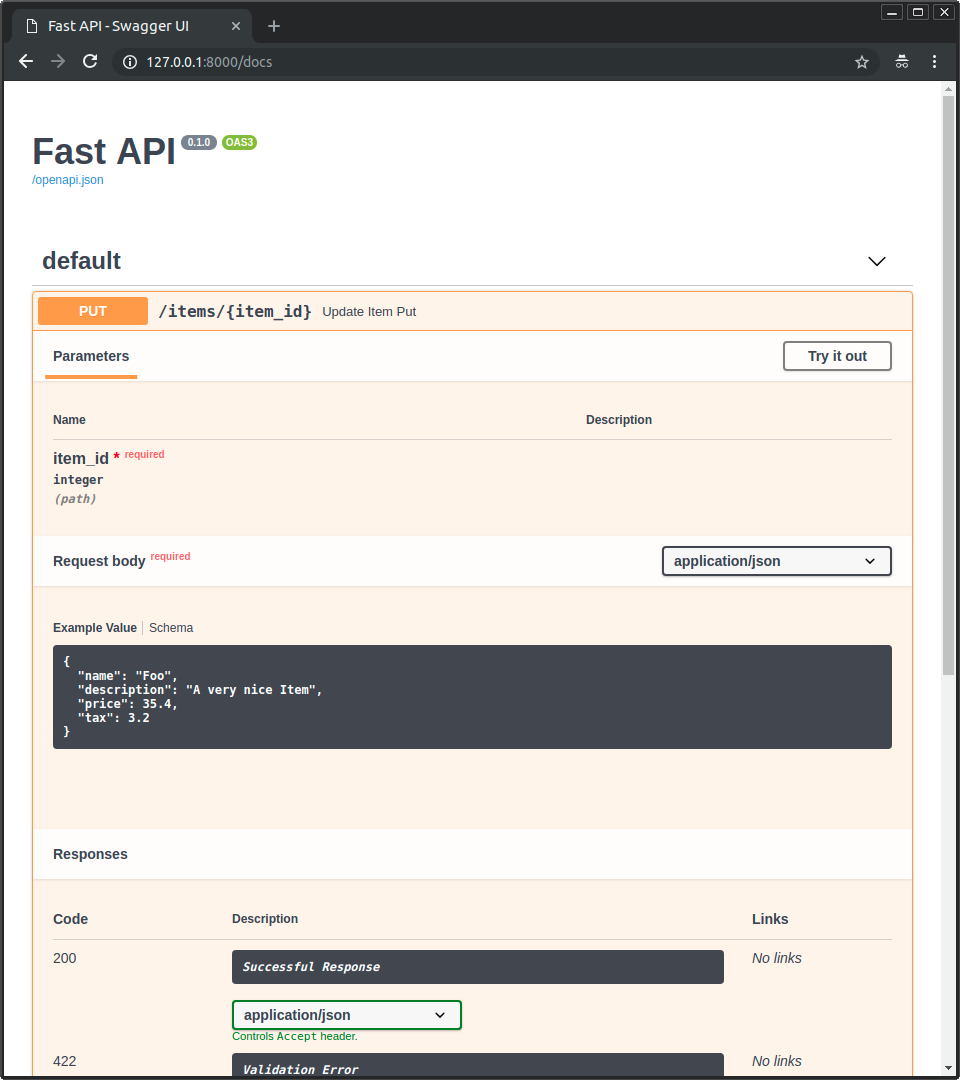
使用上述任何方法,在 /docs 中看起来将是这样:
带多个 examples 的 Body
你当然也可以传递多个 examples:
from typing import Annotated

from fastapi import Body, FastAPI
from pydantic import BaseModel

app = FastAPI()


class Item(BaseModel):
    name: str
    description: str | None = None
    price: float
    tax: float | None = None


@app.put("/items/{item_id}")
async def update_item(
    *,
    item_id: int,
    item: Annotated[
        Item,
        Body(
            examples=[
                {
                    "name": "Foo",
                    "description": "A very nice Item",
                    "price": 35.4,
                    "tax": 3.2,
                },
                {
                    "name": "Bar",
                    "price": "35.4",
                },
                {
                    "name": "Baz",
                    "price": "thirty five point four",
                },
            ],
        ),
    ],
):
    results = {"item_id": item_id, "item": item}
    return results
🤓 Other versions and variants
from typing import Annotated, Union

from fastapi import Body, FastAPI
from pydantic import BaseModel

app = FastAPI()


class Item(BaseModel):
    name: str
    description: Union[str, None] = None
    price: float
    tax: Union[float, None] = None


@app.put("/items/{item_id}")
async def update_item(
    *,
    item_id: int,
    item: Annotated[
        Item,
        Body(
            examples=[
                {
                    "name": "Foo",
                    "description": "A very nice Item",
                    "price": 35.4,
                    "tax": 3.2,
                },
                {
                    "name": "Bar",
                    "price": "35.4",
                },
                {
                    "name": "Baz",
                    "price": "thirty five point four",
                },
            ],
        ),
    ],
):
    results = {"item_id": item_id, "item": item}
    return results
from typing import Union

from fastapi import Body, FastAPI
from pydantic import BaseModel
from typing_extensions import Annotated

app = FastAPI()


class Item(BaseModel):
    name: str
    description: Union[str, None] = None
    price: float
    tax: Union[float, None] = None


@app.put("/items/{item_id}")
async def update_item(
    *,
    item_id: int,
    item: Annotated[
        Item,
        Body(
            examples=[
                {
                    "name": "Foo",
                    "description": "A very nice Item",
                    "price": 35.4,
                    "tax": 3.2,
                },
                {
                    "name": "Bar",
                    "price": "35.4",
                },
                {
                    "name": "Baz",
                    "price": "thirty five point four",
                },
            ],
        ),
    ],
):
    results = {"item_id": item_id, "item": item}
    return results
Tip
Prefer to use the Annotated version if possible.
from fastapi import Body, FastAPI
from pydantic import BaseModel

app = FastAPI()


class Item(BaseModel):
    name: str
    description: str | None = None
    price: float
    tax: float | None = None


@app.put("/items/{item_id}")
async def update_item(
    *,
    item_id: int,
    item: Item = Body(
        examples=[
            {
                "name": "Foo",
                "description": "A very nice Item",
                "price": 35.4,
                "tax": 3.2,
            },
            {
                "name": "Bar",
                "price": "35.4",
            },
            {
                "name": "Baz",
                "price": "thirty five point four",
            },
        ],
    ),
):
    results = {"item_id": item_id, "item": item}
    return results
Tip
Prefer to use the Annotated version if possible.
from typing import Union

from fastapi import Body, FastAPI
from pydantic import BaseModel

app = FastAPI()


class Item(BaseModel):
    name: str
    description: Union[str, None] = None
    price: float
    tax: Union[float, None] = None


@app.put("/items/{item_id}")
async def update_item(
    *,
    item_id: int,
    item: Item = Body(
        examples=[
            {
                "name": "Foo",
                "description": "A very nice Item",
                "price": 35.4,
                "tax": 3.2,
            },
            {
                "name": "Bar",
                "price": "35.4",
            },
            {
                "name": "Baz",
                "price": "thirty five point four",
            },
        ],
    ),
):
    results = {"item_id": item_id, "item": item}
    return results
当你这样做时,这些示例将成为该请求体数据的内部 JSON Schema 的一部分。
然而,在 撰写本文时,负责显示文档 UI 的工具 Swagger UI 不支持在 JSON Schema 中显示多个数据示例。但请阅读下文以了解解决方法。
OpenAPI 特定的 examples
在 JSON Schema 支持 examples 之前,OpenAPI 就已经支持另一个同样名为 examples 的字段。
这个 OpenAPI 特定的 examples 位于 OpenAPI 规范中的另一个部分。它位于每个路径操作的详细信息中,而不是每个 JSON Schema 内部。
并且 Swagger UI 已经支持这个特定的 examples 字段一段时间了。因此,你可以使用它来在文档 UI 中显示不同的示例。
这个 OpenAPI 特定字段 examples 的形状是一个包含多个示例的 dict(而不是 list),每个示例都带有将添加到 OpenAPI 的额外信息。
这不会进入 OpenAPI 中包含的每个 JSON Schema 内部,而是直接位于路径操作的外部。
使用 openapi_examples 参数
你可以在 FastAPI 中使用参数 openapi_examples 来声明 OpenAPI 特定的 examples,适用于:
Path()Query()Header()Cookie()Body()Form()File()
dict 的键标识每个示例,每个值是另一个 dict。
examples 中的每个特定示例 dict 可以包含:
summary:示例的简短描述。description:可以包含 Markdown 文本的长描述。value:这是显示的实际示例,例如一个dict。externalValue:value的替代方案,指向示例的 URL。尽管这可能不如value得到那么多工具的支持。
你可以像这样使用它:
from typing import Annotated

from fastapi import Body, FastAPI
from pydantic import BaseModel

app = FastAPI()


class Item(BaseModel):
    name: str
    description: str | None = None
    price: float
    tax: float | None = None


@app.put("/items/{item_id}")
async def update_item(
    *,
    item_id: int,
    item: Annotated[
        Item,
        Body(
            openapi_examples={
                "normal": {
                    "summary": "A normal example",
                    "description": "A **normal** item works correctly.",
                    "value": {
                        "name": "Foo",
                        "description": "A very nice Item",
                        "price": 35.4,
                        "tax": 3.2,
                    },
                },
                "converted": {
                    "summary": "An example with converted data",
                    "description": "FastAPI can convert price `strings` to actual `numbers` automatically",
                    "value": {
                        "name": "Bar",
                        "price": "35.4",
                    },
                },
                "invalid": {
                    "summary": "Invalid data is rejected with an error",
                    "value": {
                        "name": "Baz",
                        "price": "thirty five point four",
                    },
                },
            },
        ),
    ],
):
    results = {"item_id": item_id, "item": item}
    return results
🤓 Other versions and variants
from typing import Annotated, Union

from fastapi import Body, FastAPI
from pydantic import BaseModel

app = FastAPI()


class Item(BaseModel):
    name: str
    description: Union[str, None] = None
    price: float
    tax: Union[float, None] = None


@app.put("/items/{item_id}")
async def update_item(
    *,
    item_id: int,
    item: Annotated[
        Item,
        Body(
            openapi_examples={
                "normal": {
                    "summary": "A normal example",
                    "description": "A **normal** item works correctly.",
                    "value": {
                        "name": "Foo",
                        "description": "A very nice Item",
                        "price": 35.4,
                        "tax": 3.2,
                    },
                },
                "converted": {
                    "summary": "An example with converted data",
                    "description": "FastAPI can convert price `strings` to actual `numbers` automatically",
                    "value": {
                        "name": "Bar",
                        "price": "35.4",
                    },
                },
                "invalid": {
                    "summary": "Invalid data is rejected with an error",
                    "value": {
                        "name": "Baz",
                        "price": "thirty five point four",
                    },
                },
            },
        ),
    ],
):
    results = {"item_id": item_id, "item": item}
    return results
from typing import Union

from fastapi import Body, FastAPI
from pydantic import BaseModel
from typing_extensions import Annotated

app = FastAPI()


class Item(BaseModel):
    name: str
    description: Union[str, None] = None
    price: float
    tax: Union[float, None] = None


@app.put("/items/{item_id}")
async def update_item(
    *,
    item_id: int,
    item: Annotated[
        Item,
        Body(
            openapi_examples={
                "normal": {
                    "summary": "A normal example",
                    "description": "A **normal** item works correctly.",
                    "value": {
                        "name": "Foo",
                        "description": "A very nice Item",
                        "price": 35.4,
                        "tax": 3.2,
                    },
                },
                "converted": {
                    "summary": "An example with converted data",
                    "description": "FastAPI can convert price `strings` to actual `numbers` automatically",
                    "value": {
                        "name": "Bar",
                        "price": "35.4",
                    },
                },
                "invalid": {
                    "summary": "Invalid data is rejected with an error",
                    "value": {
                        "name": "Baz",
                        "price": "thirty five point four",
                    },
                },
            },
        ),
    ],
):
    results = {"item_id": item_id, "item": item}
    return results
Tip
Prefer to use the Annotated version if possible.
from fastapi import Body, FastAPI
from pydantic import BaseModel

app = FastAPI()


class Item(BaseModel):
    name: str
    description: str | None = None
    price: float
    tax: float | None = None


@app.put("/items/{item_id}")
async def update_item(
    *,
    item_id: int,
    item: Item = Body(
        openapi_examples={
            "normal": {
                "summary": "A normal example",
                "description": "A **normal** item works correctly.",
                "value": {
                    "name": "Foo",
                    "description": "A very nice Item",
                    "price": 35.4,
                    "tax": 3.2,
                },
            },
            "converted": {
                "summary": "An example with converted data",
                "description": "FastAPI can convert price `strings` to actual `numbers` automatically",
                "value": {
                    "name": "Bar",
                    "price": "35.4",
                },
            },
            "invalid": {
                "summary": "Invalid data is rejected with an error",
                "value": {
                    "name": "Baz",
                    "price": "thirty five point four",
                },
            },
        },
    ),
):
    results = {"item_id": item_id, "item": item}
    return results
Tip
Prefer to use the Annotated version if possible.
from typing import Union

from fastapi import Body, FastAPI
from pydantic import BaseModel

app = FastAPI()


class Item(BaseModel):
    name: str
    description: Union[str, None] = None
    price: float
    tax: Union[float, None] = None


@app.put("/items/{item_id}")
async def update_item(
    *,
    item_id: int,
    item: Item = Body(
        openapi_examples={
            "normal": {
                "summary": "A normal example",
                "description": "A **normal** item works correctly.",
                "value": {
                    "name": "Foo",
                    "description": "A very nice Item",
                    "price": 35.4,
                    "tax": 3.2,
                },
            },
            "converted": {
                "summary": "An example with converted data",
                "description": "FastAPI can convert price `strings` to actual `numbers` automatically",
                "value": {
                    "name": "Bar",
                    "price": "35.4",
                },
            },
            "invalid": {
                "summary": "Invalid data is rejected with an error",
                "value": {
                    "name": "Baz",
                    "price": "thirty five point four",
                },
            },
        },
    ),
):
    results = {"item_id": item_id, "item": item}
    return results
文档 UI 中的 OpenAPI 示例
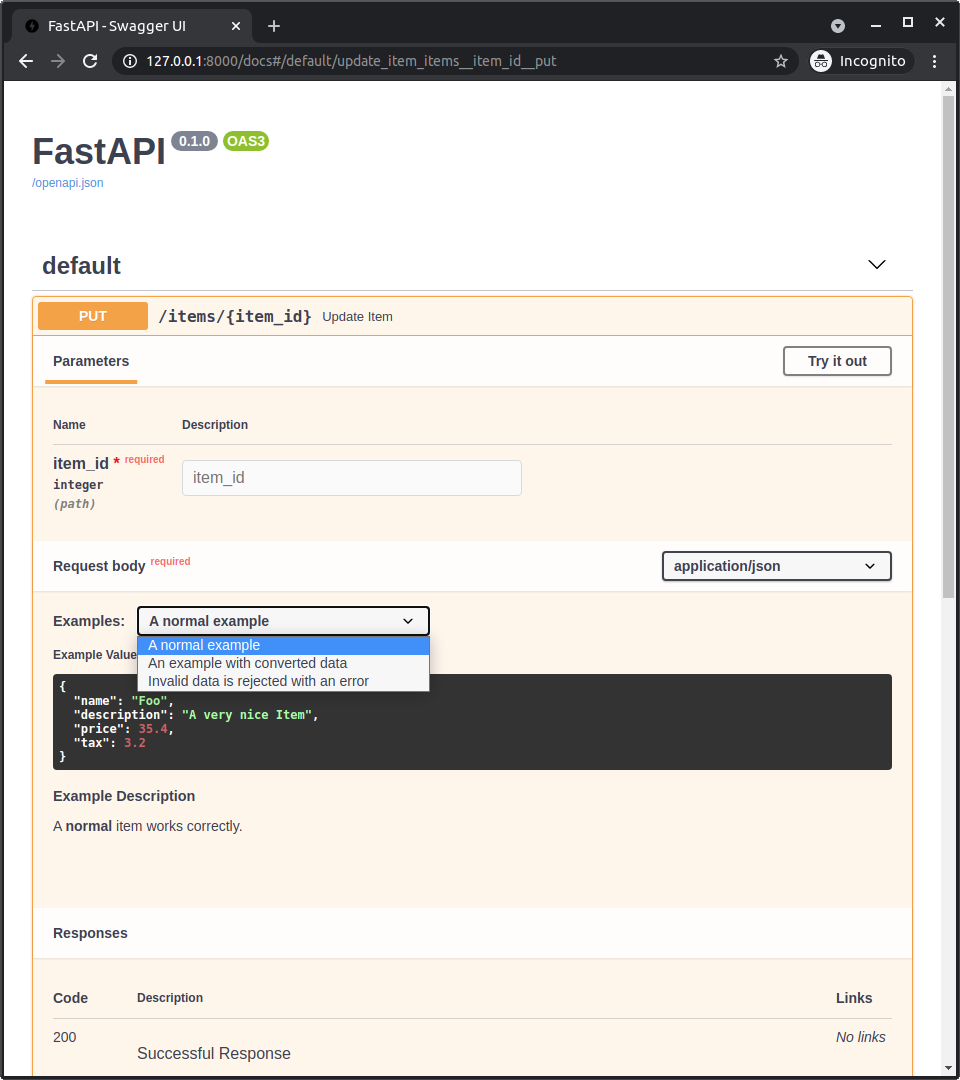
将 openapi_examples 添加到 Body() 后,/docs 将如下所示:
技术细节
Tip
如果你已经在使用 FastAPI 版本 0.99.0 或更高版本,你可能可以跳过这些细节。
这些细节对于旧版本(在 OpenAPI 3.1.0 可用之前)更为相关。
你可以将其视为一次简短的 OpenAPI 和 JSON Schema 历史课。🤓
Warning
这些是关于标准 JSON Schema 和 OpenAPI 的非常技术性的细节。
如果上述想法已经对你有用,那可能就足够了,你可能不需要这些细节,可以随意跳过。
在 OpenAPI 3.1.0 之前,OpenAPI 使用了一个较旧且修改过的 JSON Schema 版本。
JSON Schema 没有 examples,因此 OpenAPI 向其自己的修改版本添加了自己的 example 字段。
OpenAPI 还向规范的其他部分添加了 example 和 examples 字段:
Parameter Object(在规范中),被 FastAPI 的以下项使用:Path()Query()Header()Cookie()
Request Body Object,在content字段中,位于Media Type Object上(在规范中),被 FastAPI 的以下项使用:Body()File()Form()
Info
这个旧的 OpenAPI 特定 examples 参数自 FastAPI 0.103.0 起现在称为 openapi_examples。
JSON Schema 的 examples 字段
但随后 JSON Schema 向新版本的规范添加了一个 examples 字段。
然后新的 OpenAPI 3.1.0 基于最新版本(JSON Schema 2020-12),该版本包含这个新的 examples 字段。
现在,这个新的 examples 字段优先于旧的单个(且自定义的)example 字段,后者现在已被弃用。
JSON Schema 中的这个新 examples 字段只是一个 list 示例,而不是像 OpenAPI 中其他地方(如上所述)那样带有额外元数据的字典。
Info
即使在 OpenAPI 3.1.0 发布并带有这种与 JSON Schema 的更简单集成之后,有一段时间,提供自动文档的工具 Swagger UI 并不支持 OpenAPI 3.1.0(自版本 5.0.0 起支持 🎉)。
因此,FastAPI 0.99.0 之前的版本仍然使用低于 3.1.0 的 OpenAPI 版本。
Pydantic 和 FastAPI 的 examples
当你在 Pydantic 模型中使用 schema_extra 或 Field(examples=["something"]) 添加 examples 时,该示例将被添加到该 Pydantic 模型的 JSON Schema 中。
并且该 Pydantic 模型的 JSON Schema 包含在你的 API 的 OpenAPI 中,然后在文档 UI 中使用。
在 FastAPI 0.99.0 之前的版本中(0.99.0 及更高版本使用较新的 OpenAPI 3.1.0),当你使用 example 或 examples 与任何其他实用程序(Query()、Body() 等)时,这些示例不会被添加到描述该数据的 JSON Schema 中(甚至不会添加到 OpenAPI 自己的 JSON Schema 版本中),而是直接添加到 OpenAPI 中的路径操作声明中(在 OpenAPI 中使用 JSON Schema 的部分之外)。
但现在 FastAPI 0.99.0 及更高版本使用 OpenAPI 3.1.0,它使用 JSON Schema 2020-12,以及 Swagger UI 5.0.0 及更高版本,一切都更加一致,并且示例包含在 JSON Schema 中。
Swagger UI 和 OpenAPI 特定的 examples
现在,由于 Swagger UI 不支持多个 JSON Schema 示例(截至 2023-08-26),用户无法在文档中显示多个示例。
为了解决这个问题,FastAPI 0.103.0 添加了支持,用于声明相同的旧** OpenAPI 特定** examples 字段,并使用新参数 openapi_examples。🤓
总结
我曾经说过我不太喜欢历史……但现在看看我,在讲“技术历史”课。😅
简而言之,升级到 FastAPI 0.99.0 或更高版本,事情就更简单、一致和直观,你不需要了解所有这些历史细节。😎